# Homework 7 — Design and Implementation of a Simple Google
In this assignment you will develop a simple search engine called New York Search. Your program will mimic some of the features provided by Google. Please read the entire handout before starting to code the assignment.
## Learning Objectives
- Practice writing recursive programs.
- Practice using std::map and std::set.
## Background
When talking about Google Search Engine, what words come to your mind? Page Ranking? Inverted Indexing? Web Crawler?
When developing a search engine, the first question we want to ask is, where to start? When you type "Selena Gomez" or "Tom Brady" in the search box in Google, where does Google start? Does Google start searching from one specific website? The answer is Google does not start from one specific website, rather they maintain a list of URLs which are called Seed URLs. These Seed URLs are manually chosen which represent a diverse range of high-quality, reputable websites. Search engines usually have a component called web crawler, which crawls these URLs and then follow links from these web pages to other web pages. As the web crawler crawls these other web pages, it collects links from these other web pages to more web pages, and then follow these links to crawl more web pages. This process continues, ultimately, the goal is to discover as many web pages as possible. Once all pages are visited, the search engine will build a map, which is known as the inverted index, which maps terms (i.e., individual words) to web pages (also known as Documents). Below is an example:
| Key (Term) | Value (List of Document References) |
|-----------|---------------------------------------|
| apple | Document1, Document3, Document5 |
| banana | Document2, Document4 |
| orange | Document1, Document2 |
When a user enters a search query, the search engine consults its inverted index map to identify the documents that match the query term. These matching documents will then be ranked based on various factors, and the ranked documents will then be presented to the user. And this ranking process is the so-called Page Ranking.
## Implementation
Based on the above description, you can see there are 3 steps when implementing a search engine:
1. web crawling
2. query searching
3. page ranking
And thus, in this assignment, you should write your search engine following this same order of 3 steps. More details about each of these 3 steps are described below:
### Web Crawling
The Web Crawler's goal is to build the inverted index.
### Query Searching
The Query Search Component's goal is to identify the Matching Document.
### Page Ranking
Once the search engine returns the matching documents, you should rank these documents and present the most relevant documents to the user. Google uses a variety of factors in its page ranking, but in this assignment, your page ranking are required to consider the following factors:
- Backlinks: The number and quality of links from other reputable websites are assessed.
re of all pages, present them to the user in descending order, i.e., pages whose final score is higher should be presented first.
## Assignment Scope
To reduce the scope of the assignment, and hence reduce the amount of work from you, we make the following rules for this search engine.
### Rule 1. Case-sensitive Search Engine
Search engines are usually case-insensitive, but making the search engine case-insensitive will require some extra work and likely need to call some functions we have not learned in this course. Therefore, to simplify your tasks and reduce the amount of your work, in this assignment, the search engine you are going to implement is case-sensitive.
### Rule 2. Search HTML Files Only
Search Engines like Google will search all types of files on the Internet, but in this assignment, we assume all files we search are HTML files. And we consider an HTML file contains the search query only if the search query can be found within the <body> section of the HTML file. The <body> section, enclosed within the <body></body> tags in an HTML document, represents the primary content area of the web page.
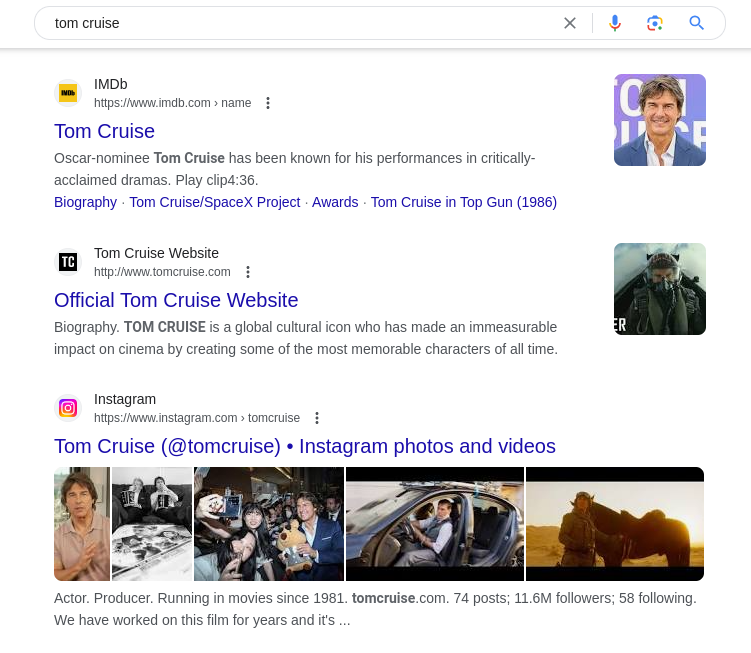
Based on Rule 1 and Rule 2: when the search query is *Tom Cruise*, the third page showed in this image should not be included in your search results, unless the words *Tom Cruise* appears in the other part of the <body></body> section of this web page, which is not displayed here.
### Rule 3. Search Query: No More Than 3 Words
We also limit the user to search no more than 3 words in each query. Based on this rule, we allow users to search *Tom*, *Tom Cruise*, *Tom and Jerry*, but *Tom Hanks Academy Award* is not allowed, as it contains more than 3 words.
### Rule 4. Local Searching Only
The search engine you implement will not search anything on the Internet, as that requires extensive knowledge in computer networks and will need to include network libraries, which is way beyond the scope of this course. In this assignment, we limit our searches to a local folder, which is provided as [html_files](html_files).
You are also not allowed to use file system libraries to access the HTML files.
## Supported Commands
Your program will be run like this:
```console
nysearch.exe html_files/index.html output.txt Tom
nysearch.exe html_files/index.html output.txt Tom Cruise
nysearch.exe html_files/index.html output.txt Tom and Jerry
```
Here:
- *nysearch.exe* is the executable file name.
- html_files/index.html is the SEED URL.
- output.txt is where to print your output to.
- *Tom* is an example of a search query which contains one word, *Tom Cruise* is an example of a search query which contains two words, *Tom and Jerry* is an example of a search query which contains three words.
### Regular Search vs Phrase Search
Your search engine should support both regular search and phrase search.
1. When searching multiple words with double quotes, it is called a phrase search. In phrase search, the whole phrase must exist somewhere in the searched document. In other words, the search engine will search for the exact phrase, word for word, and in the specified order.
2. When searching multiple words without double quotes, it is called a regular search. In this assignment, we define the term *regular search* as such: the search engine should look for documents which contain every word of the search query, but these words do not need to appear together, and they can appear in any order within the document.
Based on the above definition, a document which contains the following two lines (in the body section of the HTML file) is a valid document when the user searches *Tom Cruise*:
```console
Tom and Jerry show
Have Fun And Save Now With Great Deals When You Cruise With Carnival. Book Online Today.
```
But it is not a valid document if the user does a phrase search - "*Tom Cruise*", as no exact match can be found in this document.
## Input Files
To be added.
### Output File Format and Order
The output of your program should go to the output file.
- If no matches can be found for a search query, your search engine should print the following message to the output file.
```console
Your search - dsdwoddjojdjeokdddfjwoewojo - did not match any documents.
```
Replace *dsdwoddjojdjeokdddfjwoewojo* with the search query.
This behavior matches with what Google does.
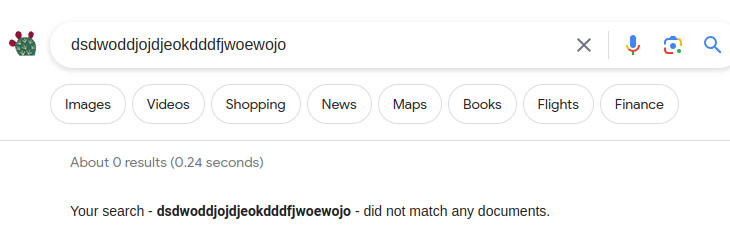
- If matches are found, you should print the ranked results in a format similar to what Google does, as shown in this following image:
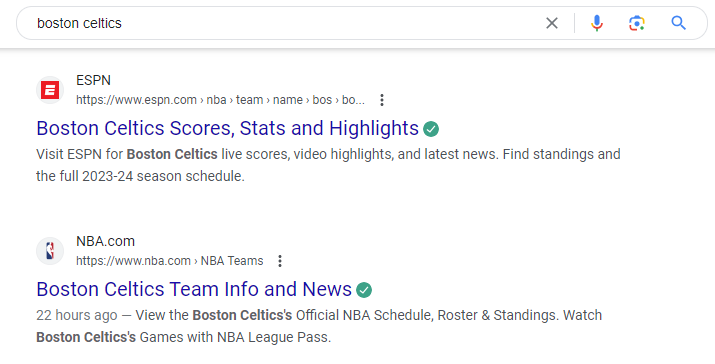
More specifically, for each document, print
1. the title
2. the url
3. the description
4. a snippet
### The Title
In all HTML files we provide, in the <head> section of the HTML, we have a "title" element. It is used to define the title of the web page or document. In the following example, the text "ESPN" within the <title> tags represents the title of the web page, which is typically displayed in the browser's title bar or tab, and it is often used by search engines to display the title of the page in search results.
```html
ESPN
```
### The URL
This portion will be different from what Google shows, as our search is limited to the [html_files](html_files) folder, the URL we present will just be a path within this folder.
### The Description
In all HTML files we provide, in the <head> section of the HTML, we have a meta description tag which provides a brief description of the page's content. This description is often displayed by search engines in search results give users an idea of what the web page is about. The following is an example:
```html
```
Here, "Boston Celtics Scores, Stats and Highlights" is the description.
### The Snippet
This snippet contains an excerpt from the page's content that is directly related to the search query. In this assignment, the requirements for this snippet is:
1. It should contain exactly 120 characters.
2. It should start from the beginning of a sentence which contains the query.
This means the query itself may not appear in the snippet.
#### Period Before the Sentence
## Useful String Functions
You are recommended to use the following string functions.
- find
- substr
- find_last_of
- erase
- rfind
- std::isspace
## Provided Functions
Parsing an HTML file and extract all the links from this file may require some regular expression library functions, and using these regular expression library functions is beyond the scope of this course, and thus the following function (which calls regular expression library functions) is provided for you. This function takes a std::string argument, representing the content of an HTML file, and this function will extract all links in this HTML file, and return them as a linked list, represented by an std::list<std::string> object.
```cpp
// Function to parse an HTML file and extract links to local files
std::list ExtractLinksFromHTML(const std::string& htmlContent) {
std::list links;
// Regular expression to match href attributes in anchor tags
std::regex linkRegex("]*href\\s*=\\s*['\"]([^'\"]+)['\"][^>]*>");
std::smatch match;
// Search for links in the HTML content
std::string::const_iterator start = htmlContent.cbegin();
while (std::regex_search(start, htmlContent.cend(), match, linkRegex)) {
if (match.size() > 1) {
links.push_back(match[1].str());
}
start = match.suffix().first;
}
return links;
}
```
In order to use this function, you need to include the regex library like this:
```cpp
#include
```
## Program Requirements & Submission Details
In this assignment, you are required to use std::map, or std::set. You are recommended to use both. You are NOT allowed to use any data structures we have not learned so far, but feel free to use data structures we have already learned, such as std::string, std::vector, std::list. In addition, **the web crawler component of your program must be recursive**.
Use good coding style when you design and implement your program. Organize your program into functions:
don’t put all the code in main! Be sure to read the [Homework Policies](https://www.cs.rpi.edu/academics/courses/fall23/csci1200/homework_policies.php) as you put the finishing touches on your solution. Be sure to make up new test cases to fully debug your program and don’t forget
to comment your code! Use the provided template [README.txt](./README.txt) file for notes you want the grader to read.
You must do this assignment on your own, as described in the [Collaboration Policy & Academic Integrity](https://www.cs.rpi.edu/academics/courses/fall23/csci1200/academic_integrity.php) page. If you did discuss the problem or error messages, etc. with anyone, please list their names in your README.txt file.
**Due Date**: 11/02/2023, Thursday, 23:59pm.
## Rubric
20 pts
- README.txt Completed (2 pts)
- One of name, collaborators, or hours not filled in. (-1)
- Two or more of name, collaborators, or hours not filled in. (-2)
- OVERALL CLASS DECLARATION & IMPLEMENTATION AND CODING STYLE (Good class design, split into a .h and .cpp file. Functions > 1 line are in .cpp file. Organized class implementation and reasonable comments throughout. Correct use of const/const& and of class method const. ) (8 pts)
- No credit (significantly incomplete implementation) (-8)
- Putting almost everything in the main function. It's better to create separate functions for different tasks. (-2)
- Function bodies containing more than one statement are placed in the .h file. (okay for templated classes) (-2)
- Missing include guards in the .h file. (Or does not declare them correctly) (-1)
- Functions are not well documented or are poorly commented, in either the .h or the .cpp file. (-1)
- Improper uses or omissions of const and reference. (-1)
- Overly cramped, excessive whitespace, or poor indentation. (-1)
- Poor file organization: Puts more than one class in a file (okay for very small helper classes) (-1)
- Poor variable names. (-1)
- Contains useless comments like commented-out code, terminal commands, or silly notes. (-1)
- DATA REPRESENTATION (8 pts)
- Uses data structures which have not been covered in this class. (-8)
- Neither std::map nor std::set is used. (-8)
- RECURSION (2 pts)
- Does not use recursion in the web crawler component. (-2)